What Rank Kiwi Does
Rank Kiwi is a browser extension for creator-content research on Instagram and YouTube.
Rather than browsing posts chronologically or guessing which content broke out, Rank Kiwi calculates creator-relative performance benchmarks and identifies posts that performed dramatically above that creator's typical baseline.
The Core Mental Model: Choose a creator → Analyze visible content → Rank the content → Identify unusually strong performers → Study the outliers → Use findings to make informed content decisions.
Rank Kiwi is not a generic analytics dashboard. It requires no social account logins, accesses zero passwords, and stores zero analyzed creator data on external servers. All operations execute 100% locally inside your browser sandbox.
Installation & Browser Setup
Installing Rank Kiwi takes under 30 seconds from the Chrome Web Store.
Step 1: Install from the Chrome Web Store
Visit the official Rank Kiwi extension listing on the Chrome Web Store and click Add to Chrome.
Step 2: Pin the Extension for Quick Access
After Chrome confirms installation, click the puzzle piece icon (Extensions) in your browser toolbar and click the Pin icon next to Rank Kiwi. This keeps the Rank Kiwi kiwi icon visible whenever you browse Instagram or YouTube.
Step 3: Confirm Browser Permissions
Rank Kiwi operates directly on the active webpage to read visible post information. Chrome grants access to active tabs on supported creator sites without requiring broad browser-wide tracking permissions.
Supported Platforms & Surfaces
Rank Kiwi detects creator profiles when you navigate to specific platform surfaces:
| Platform |
Supported Surface |
Optimal URL Structure |
Content Types Analyzed |
| Instagram |
Reels Tab (Recommended) |
instagram.com/creator/reels/ |
Reel short-form videos with view counts |
| Instagram |
Main Profile Grid |
instagram.com/creator/ |
Feed Posts, Carousels, and Reels |
| YouTube |
Channel Videos Tab |
youtube.com/@channel/videos |
Long-form video uploads |
| YouTube |
Channel Shorts Tab |
youtube.com/@channel/shorts |
YouTube Shorts video feed |
Note on Unsupported Surfaces: Rank Kiwi is designed for creator catalogs and channel profiles. It does not analyze your personal home feed, algorithm explore pages, or private direct message threads.
Understanding the Workspace & UI
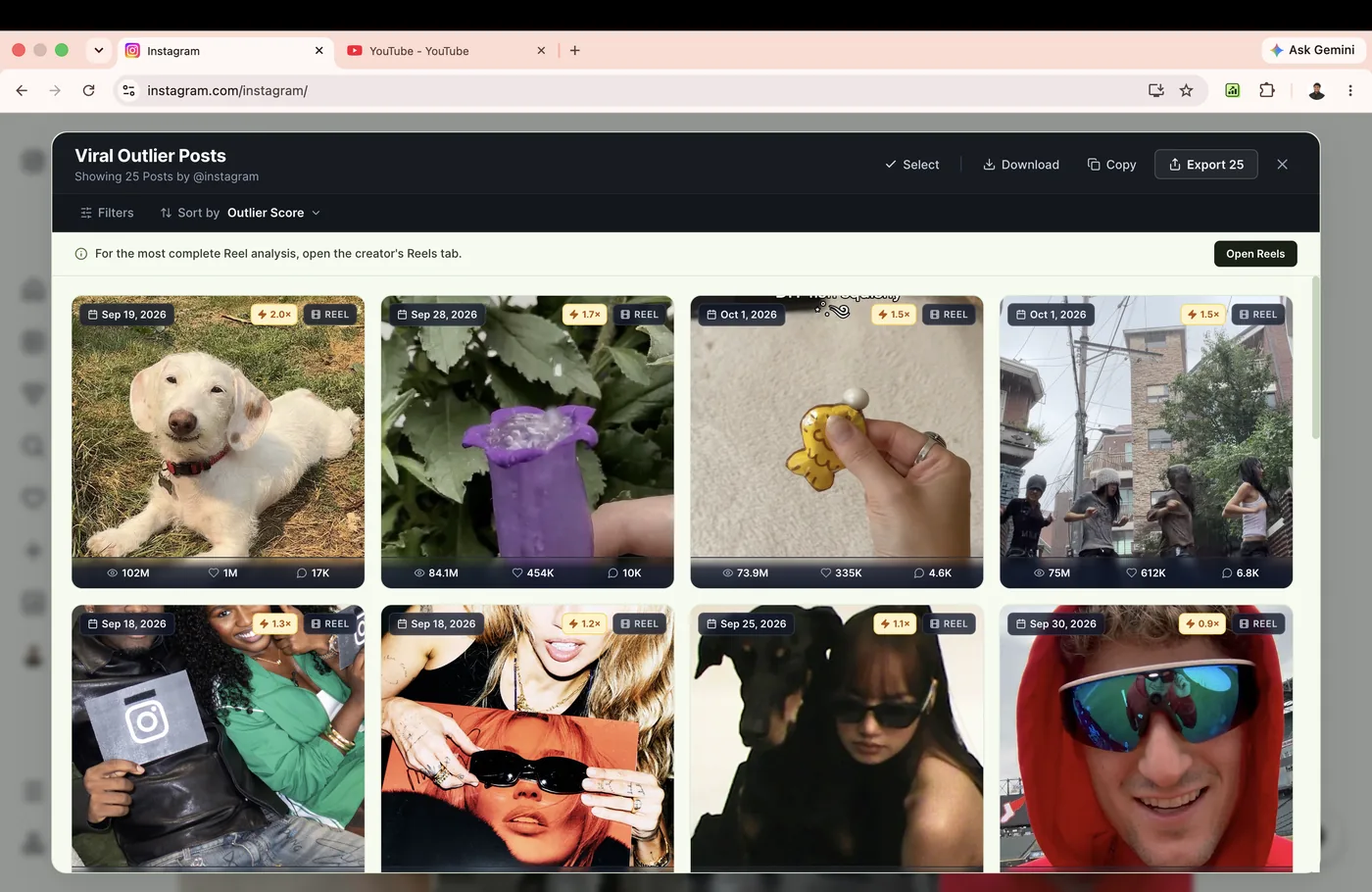
When you trigger an analysis, Rank Kiwi renders a clean, focused research overlay with five core components:
1
Header & Profile Summary: Displays creator handle, total items analyzed, and computed median baseline.
2
Sort & Filter Bar: Switch between Views, Outlier Score, Likes, Comments, or apply date filters.
3
Outlier Score Badge: Prominently highlights relative performance multiplier (e.g. 3.2× or 5.8×).
4
Content Card Grid: Visual cards showing post thumbnail, duration, view count, and hook preview.
Analysis Sample Controls
Rank Kiwi allows you to choose your analysis depth before scanning:
- 25 Posts: Ideal for rapid spot checks and recently published content trends.
- 50 Posts: Recommended standard sample size for accurate median baseline calculation.
- 100 Posts: Deep catalog research for established creators across several months.
- Custom: Enter a custom item count based on your research scope.
