
YouTube channel & Shorts research extension
YouTube channel outlier scanner
Uncover breakout videos and Shorts benchmarked against channel medians in seconds.
Rank Kiwi is an in-browser creator research workspace that evaluates a YouTube channel's recent uploads against its own median performance baseline. Instead of judging videos by raw subscriber counts, it calculates an Outlier Score (e.g. 4.2× channel median). This immediately reveals which packaging concepts, titles, and thumbnails generated breakthrough reach, and allows you to download uncompressed 1080p thumbnail images and export clean Excel (.xlsx) and CSV datasets in seconds.
Why raw metrics mislead
When researching YouTube competitors, looking only at raw view counts produces severe false positives and false negatives.
Channel A: large authority
1,500,000 Subscribers • Typical video: 120,000 views. A video with 150,000 views here is merely typical baseline distribution (1.2×). It does not represent an exceptional packaging breakthrough.
Channel B: emergent creator
25,000 Subscribers • Typical video: 8,000 views. A video with 85,000 views here is an explosive 10.6× Outlier. That title and thumbnail packaging reached 10× beyond their subscriber core.
Recent vs historical outliers
YouTube's native "Most Popular" tab surfaces videos uploaded years ago. Rank Kiwi analyzes a recent sample (e.g. last 50 uploads) to show what packaging works in today's algorithmic environment.
Videos & Shorts analysis
Long-form and vertical formats have completely different distribution curves. Rank Kiwi treats them as distinct datasets.
youtube.com/@[channel]/videos
Scan the creator's dedicated long-form catalog. Evaluate titles, video duration, published dates, and view counts against channel median.
- Isolate thumbnail title combinations that drove 3×+ outliers
- Filter by minimum view thresholds (e.g. > 50,000 views)
- Download full 1920×1080 HD thumbnail images
youtube.com/@[channel]/shorts
Shorts have high viral velocity but volatile baselines. Rank Kiwi scans the vertical catalog and benchmarks Shorts strictly against other Shorts.
- Zero distortion from long-form video metrics
- Rank by view multipliers (e.g. 5× or 12× baseline)
- Export hook titles and URLs directly to Google Sheets
Research any YouTube channel
Real screenshots from the Rank Kiwi YouTube research workspace.
Open any creator
Open any YouTube channel. On the “Researching this channel?” card, click Explore Creator Analytics.
- Detects the channel handle automatically (“Analyzing @channel • Videos”)
- Zero login credentials or API keys needed
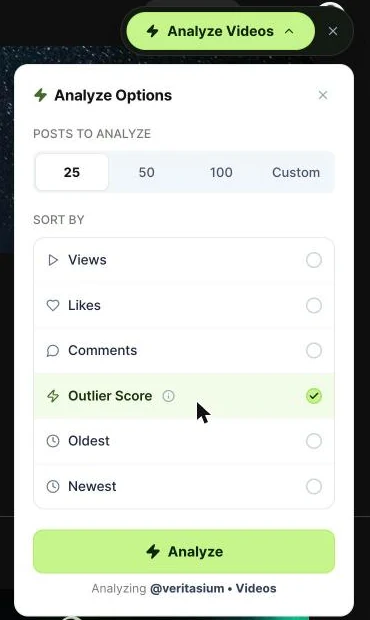
Click Analyze
Pick 25, 50, 100 or any number of videos and click Analyze. About 15 seconds later, every video is scored against the channel’s normal (its median views). Long-form videos and Shorts are scored separately.
Worked out in your browser
No API key, no YouTube login. Rank Kiwi reads the public numbers already on the page and calculates the median on your computer.
See the breakouts
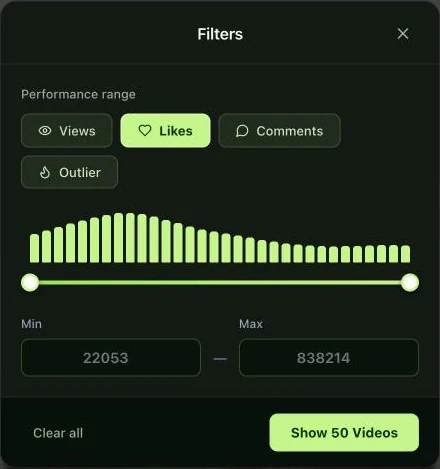
Results open in the Viral Outlier Videos modal, sorted by Outlier Score. Narrow them with Filters, then click any video to inspect title packaging, copy its description, or click Download Thumbnail for the highest-resolution asset.
Save high-resolution thumbnail swipe files
Thumbnails represent 50% of YouTube CTR. When you spot an outlier, you can immediately save the creator's upload at maximum resolution via Rank Kiwi's CDN resolution fallback:
*Saved thumbnails are for analytical, educational, and swipe-file research under fair use. Never re-upload another creator's artwork.
Transparent YouTube limitations
Rank Kiwi parses data publicly accessible from YouTube's desktop web interface:
- Live Streams: The
/streamstab uses different DOM metadata schemas; Rank Kiwi is designed specifically for/videosand/shorts. - Watch Pages: Analysis must be triggered on channel catalog tabs, not while watching a single video on
/watch?v=.... - Shorts Comments: YouTube's channel Shorts grid exposes views and likes in DOM hover states, but comments require opening individual Shorts.
Read more in our YouTube Limitations Reference →
Frequently asked questions
Common questions about researching YouTube channels with Rank Kiwi.
How does Rank Kiwi calculate a YouTube channel's median?
Rank Kiwi extracts the view counts of the sampled videos (e.g. 50 videos), sorts them numerically, and selects the exact middle value. This median represents typical performance without being distorted by one viral runaway hit.
Can I analyze YouTube Shorts separately from long-form videos?
Yes. When you open the channel's /shorts tab, Rank Kiwi computes a Shorts-specific median. Your Shorts metrics are never combined with or distorted by long-form video views.
Can I download full-resolution YouTube thumbnails?
Yes. Rank Kiwi includes a direct thumbnail fetcher that retrieves the maximum resolution upload (1080p maxresdefault.jpg) directly from YouTube's media servers.
Why is Outlier Score better than sorting by "Most Popular" on YouTube?
YouTube's native "Most Popular" tab surfaces videos from 6 years ago that accumulated views over half a decade. Rank Kiwi analyzes recent sample batches (e.g. the last 50 uploads) to show what packaging works in today's algorithm.
Do I need YouTube API keys or an account?
No API keys or YouTube account permissions are required. Rank Kiwi reads only the publicly visible DOM elements in your active tab locally in Chrome.
Does Rank Kiwi download YouTube videos or transcribe YouTube audio?
No. Rank Kiwi does not download YouTube video or audio streams, and does not transcribe YouTube videos. It downloads high-resolution video thumbnails (1080p), extracts public engagement metrics, and calculates Outlier Scores. (Audio transcription is supported exclusively for Instagram Reels).
Start researching YouTube channels in seconds
Install Rank Kiwi for free. Open any YouTube channel and find their breakout videos and viral Shorts.
Add to Chrome It’s free